GitHub


The Lock Screen is the status board
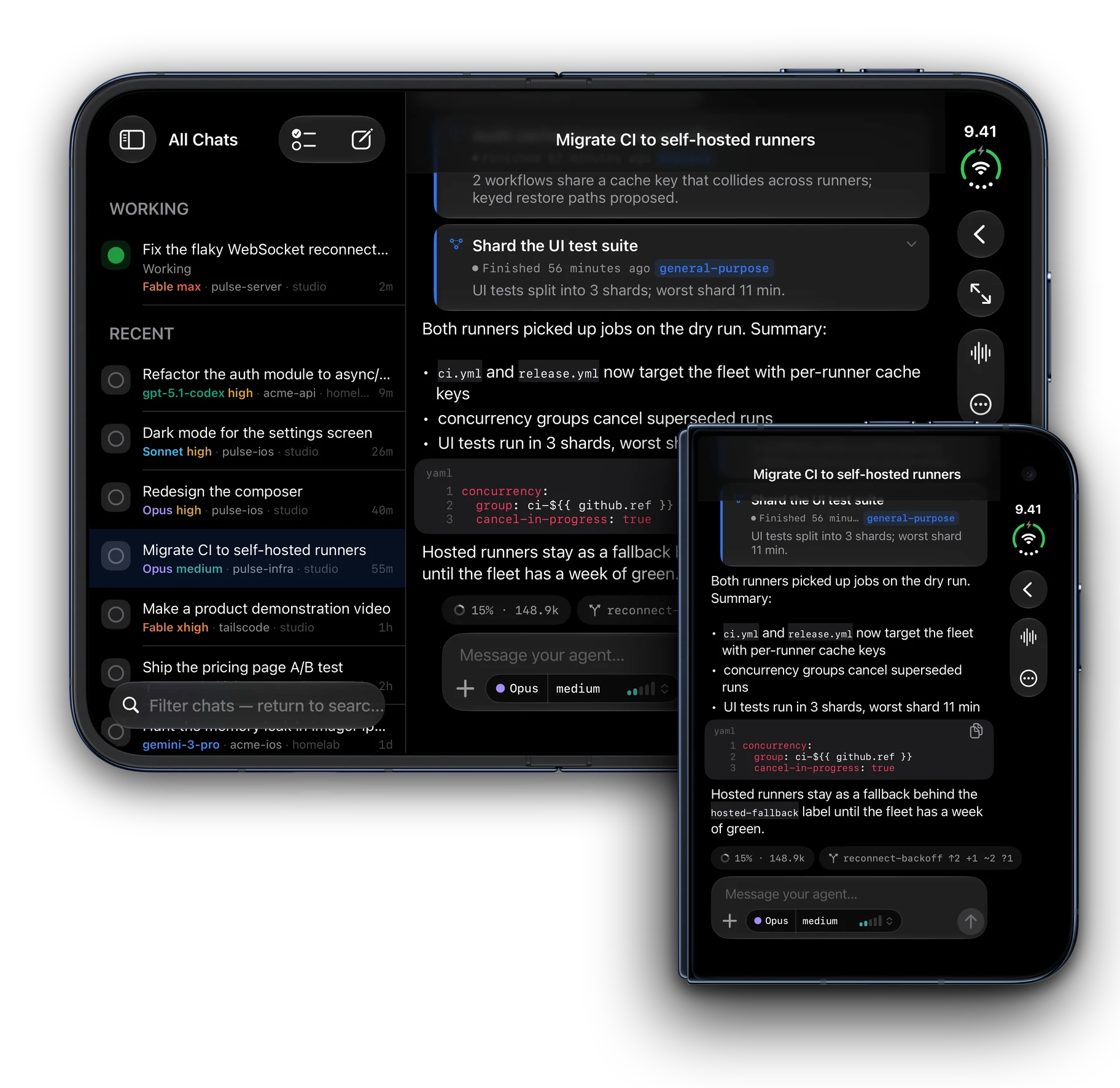
A Live Activity per conversation shows what the agent is doing, for how long and how many tools it has run. An approval alerts you; a finished turn lingers with its outcome. Tap to land in the exact chat.
Tailscode
Coding Agent Remote
Send a prompt to Claude Code, opencode or Oh My Pi, pocket the phone, and watch the turn finish. Approve, answer and read the diff over your own tailnet, from the iPhone, iPad, Mac or Linux.
iPhone, iPad and Mac share one purchase on the App Store · Mac App Store ↗ · Free, Pro is $14.99 once


tailscode --lock-screen
Your agent is working on a machine across the room, or across the country. The turn lives on your Lock Screen the whole time, and the moment it needs you it says so.

tailscode --trust
Your phone talks to your machine, and your chats and code go nowhere else. Three facts you can check, and a licence that lets you.
No relay
no Tailscode server sits between you and the machine
No sign-in
nothing to sign up for, nothing to leak
Your code stays home
chats and code never reach us
check it yourself
tailscale status lists the nodes involved: your phone and your machine, both yours. tailscale ping <machine> says whether the path is direct or goes through one of Tailscale’s own DERP relays. git clone github.com/guitaripod/Tailscode the app, the engine and both bridges are GPL-3.0. Read what it sends. The honest footnotes: Tailscale itself may relay encrypted packets when two devices cannot reach each other directly, and Tailscode adds no hop of its own. Your agent still talks to its own model provider. And a claude-bridge that holds an Apple push key sends Lock Screen updates through Apple's push service, carrying the conversation's title, its phase and tool counts. The App Store apps also keep a random Midgar ID for your Pro and tip purchases and send anonymous More Apps counts, none of it near your chats or code. Read the privacy policy.
tailscode sync --watch
One real ultracode turn, captured on both machines at once. A prompt leaves the iPhone, reaches a claude-bridge server over the tailnet, and the session is already live in the Linux sidebar. Both composers burn the rainbow while it runs, and both show the same answer when it settles. No relay sees a byte.

ls ~/tailscode/iphone
Every frame is the built-in demo: what you see before wiring a single server. Scroll the rail; tap a screen for the full-resolution picture.


./tailscode --iphone-duo
tailscode --usage --month
A price is a conversation's, and the month is the account's. The numbers come from the machines that hold the transcripts, so nothing about your spend is sent anywhere to be added up.
trophies · game center
The ledger is also a game. 27 trophies and four leaderboards (streak days, and turns, tokens and tool calls over thirty days) are scored from the same numbers, and Apple's Game Center shows them. Signing in is optional: the trophy card renders whole without an account.


tailscode studio --on arch
Describe it and your own machine paints it: ComfyUI behind Tailscale, Qwen-Image for quality, FLUX 3 Klein for speed. A clip is the same sentence with a longer verb, rendered by LTX from words or from a first frame. Nothing leaves your tailnet.
FLUX 3 Klein, editing from several pictures and the live preview arrive with 1.78: on Linux today, on the iPhone and the Mac when App Review clears it.


ls ~/tailscode/ipad
On iPad the sidebar holds places, chat scopes and servers, the chat list sits beside it and the conversation fills the rest. Narrow the window and it becomes the phone's app without closing the chat you were in; a chat opens in its own window for Stage Manager, and a hardware keyboard drives it all.


ls ~/tailscode/desktop
The phone is programmatic UIKit, the Mac native AppKit, Linux native GTK4. All three render the same toolkit-free core, and a parity registry refuses to compile a client that hasn't answered for a capability the others have.


tailscode --features
A Live Activity per conversation shows what the agent is doing, for how long and how many tools it has run. An approval alerts you; a finished turn lingers with its outcome. Tap to land in the exact chat.
Allow once, always or deny, right under the diff, while the agent waits. A question arrives as a card you answer with a tap. Queue the next message, edit it before it goes, or stop the turn on the server.
All your servers' conversations in one list: live turns first, grouped by project. Subagents open in place inside the turn that spawned them; a compaction is a seam you can read.
Branch, drift from upstream, staged, changed and the real patch of any file, read from the machine that owns it. Nothing offers to commit or push: a change made from a phone is a change nobody reviewed.
Every conversation priced, every month totalled across machines by model, project and tool. Always marked an estimate: a subscription bills a flat fee, so the figure is API-equivalent value, never a bill.
Each provider's tightest window and its reset clock on Home and in a widget: Claude plan limits, Grok quotas, Ollama Cloud, DeepSeek balance. The board holds still while you read it.
Which model and how hard it thinks are one decision: tap a level or slide to it, pin a pair, swipe to cycle. Ultracode burns a rainbow along the composer's edge.
opencode directly, Claude Code through claude-bridge, Oh My Pi through omp-bridge: two open-source companion servers. Every model Oh My Pi can reach is one picker away.
Programmatic UIKit on iOS, GTK4 on Linux, AppKit on the Mac, all Swift 6. Answers play out at a reading pace with nothing re-wrapping under you, and code copies byte-exact.
tailscode --pricing
Free
$14.99 once
One purchase covers iPhone and Mac on the same Apple Account. The Linux client and the Mac build you compile yourself are free, open-source and complete: the unlock is how the work gets funded, not a wall around it.
man tailscode
tailscode --help
Yes. The free app is the complete core: one server, full chat, approvals and questions, attachments, models, forking, Live Activities, the analytics and the git surface. Tailscode Pro is a one-time $14.99 unlock for unlimited servers, concurrent Live Activities on iPhone, the delegate board (beta) and a supporter badge. There is no subscription, and the Linux client and a Mac build you compile yourself are free and complete.
A computer you code on, running opencode, Claude Code through claude-bridge, or Oh My Pi through omp-bridge; Tailscale (free for personal use) on that machine and on your phone; and the app. Set-up is three steps the app verifies as you go. No server yet? Tap 'Try the demo' on the first screen to explore every screen with sample conversations, no tailnet needed.
Not by Tailscode. Prompts, answers, diffs and files travel between your devices and your machines over your own Tailscale network, and never reach us. There is no Tailscode server between them and nothing to sign in to. The App Store apps do keep a random Midgar ID, report your Pro or tip purchase to our ledger and send anonymous More Apps counts; none of it is used for tracking, and the Linux app and the direct Mac build collect nothing. The privacy policy lists every row, and the source is public. Your agent still talks to its own model provider the way it always did; that part is between you and them. One optional exception: if your claude-bridge holds an Apple push key, Lock Screen updates ride Apple's push service and carry the conversation's title, its phase and tool counts.
It is built around Tailscale: set-up checks your tailnet, and the bridges admit a device signed into the same Tailscale account without a password. A server reachable some other private way (a LAN, another VPN) works with the server's password, but then the privacy claim rests on that route rather than on ours.
opencode natively, 1.x or 2, with any provider you've configured in it; Claude Code through claude-bridge; and Oh My Pi through omp-bridge. The bridges are open-source Swift servers that expose a terminal agent as structured streaming sessions backed by your own subscriptions. Oh My Pi brings its whole provider catalog: Ollama Cloud, OpenCode Go, OpenRouter, Anthropic, xAI, DeepSeek and your local ollama.
Yes: a native AppKit app for macOS 26, on the Mac App Store under the same purchase as the iPhone app, and a native GTK4/libadwaita app for Linux. Arch users install it from the AUR (`paru -S tailscode`); everyone else grabs the release tarball from GitHub. Both desktops add tiling splits and a global quick-ask hotkey; the Linux client and a Mac build you compile yourself also carry an embedded terminal and web and video panes, which the sandboxed Mac App Store build leaves out.
Two optional ways. claude-bridge can push Live Activity updates over Apple's push service. And when a turn ends while the app is closed, iOS holds a background request that the server answers only when the turn ends or stops for you (claude-bridge 1.13+, omp-bridge 0.7+, opencode 2), then posts the notification; that wait runs straight over your tailnet, not through Midgar or Apple. Background App Refresh off, or a force-quit, silences it, and Settings says so.
Tailscode Pro is a one-time $14.99 unlock for unlimited servers, concurrent Live Activities on iPhone, a supporter badge and the delegate board, a beta that hands routine tasks to a cheaper model and lets a verifier decide. The free app is the complete core forever, with one server.
On a machine of yours running ComfyUI, reached over your tailnet: Qwen-Image or FLUX 3 Klein for pictures, LTX for clips. Tailscode is the brief, the stage and the shelf; the files stay in the machine's own output folder, and nothing leaves your tailnet.
Yes, with a Mac. A Mac running previewd, a small host that runs next to Xcode, builds the app on a simulator of its own and streams the screen; Tailscode draws it beside the conversation, keeps the last good picture under the compiler’s first error when a build fails, and hands that error to the agent in one tap. On Linux the pointer operates the app, and the Compare, Inspect, Quality, Matrix and Rewind lenses are built; the iPhone and the Mac show the picture.
All of it, under GPL-3.0: the iPhone app, both desktop clients, the engine (CodingAgentKit, a Swift 6 package that also runs on Linux), and both bridges (claude-bridge, omp-bridge). Build it yourself or grab it from the App Store.
Free and open source under GPL-3.0. Pro unlocks unlimited servers and concurrent Live Activities on iPhone for $14.99, one time, across iPhone and Mac.
ls ~/apps